How to Analyze a Commercial Real Estate Offering Memorandum
You received an OM from a broker. Before you spend time on a tour, a model, or a deeper underwriting package, pull the key figures, check them against the PDF, and decide whether the deal deserves another look.
What an OM is
OM stands for offering memorandum. In commercial real estate it is the broker’s marketing package for a property: usually a PDF with asking price or pricing guidance, income and expense highlights, occupancy or lease cues, property facts, and broker contacts. It is a starting package, not a complete diligence file. Rent rolls, T-12 statements, leases, and seller books often arrive later.
Figures to pull first
Most retail, office, and industrial OMs put these items near the front or in a financial summary:
- Asking price or priced guidance
- NOI as stated in the package (in-place, trailing, or pro forma — note which)
- Cap rate if shown, or the implied rate from NOI and price
- Occupancy / vacancy and any unit-mix summary
- Expense lines that are actually listed
- Broker contacts on the file
Write down the label the OM uses. “Year-1 pro forma NOI” and “trailing NOI” are not interchangeable, and the rest of the review depends on that distinction.
Six checks before you go further
The first two rows are checks you can often finish from the OM alone. The next ones need additional documents. CRE Pipeline does not invent those missing documents from a single OM upload.
-
Cap rate arithmetic. If the OM states NOI and price,
confirm
cap rate = NOI / price. If the stated cap does not match, find which NOI definition the broker used. - Missing expenses stay blank. If a line is absent from the OM, leave it blank in your notes. Do not fill gaps with round numbers just to complete a sheet.
- NOI versus T-12. Compare the OM NOI to the trailing twelve-month operating statement when you have the T-12. This is a document-to-document check, not something an OM-only pass can finish.
- Occupancy versus rent roll. Match occupancy, vacancy, and tenant mix to the rent roll when that schedule is available.
- Broker pro forma versus actuals. Separate marketed pro forma figures from in-place or trailing results before you treat either as the base case.
- Source page for each figure. Keep the PDF page or section where each number appears so a later review can reopen the same spot.
Worked example: Riverside Commerce Center (synthetic)
Riverside Commerce Center is a fabricated fixture for this page. The property, price, NOI, and tenants below are invented for teaching the checklist. They are not a live listing and not a client deal.
| Property | Riverside Commerce Center (synthetic) |
|---|---|
| Asking price | $8,400,000 |
| Stated NOI | $546,000 |
| Implied cap rate | $546,000 ÷ $8,400,000 = 6.50% |
| Check | Stated 6.50% matches the arithmetic on these two figures. |
That match only confirms internal consistency of the OM summary. It does not prove the NOI against a T-12 or the occupancy against a rent roll. Those checks still wait for the supporting files.
What CRE Pipeline does with an OM PDF
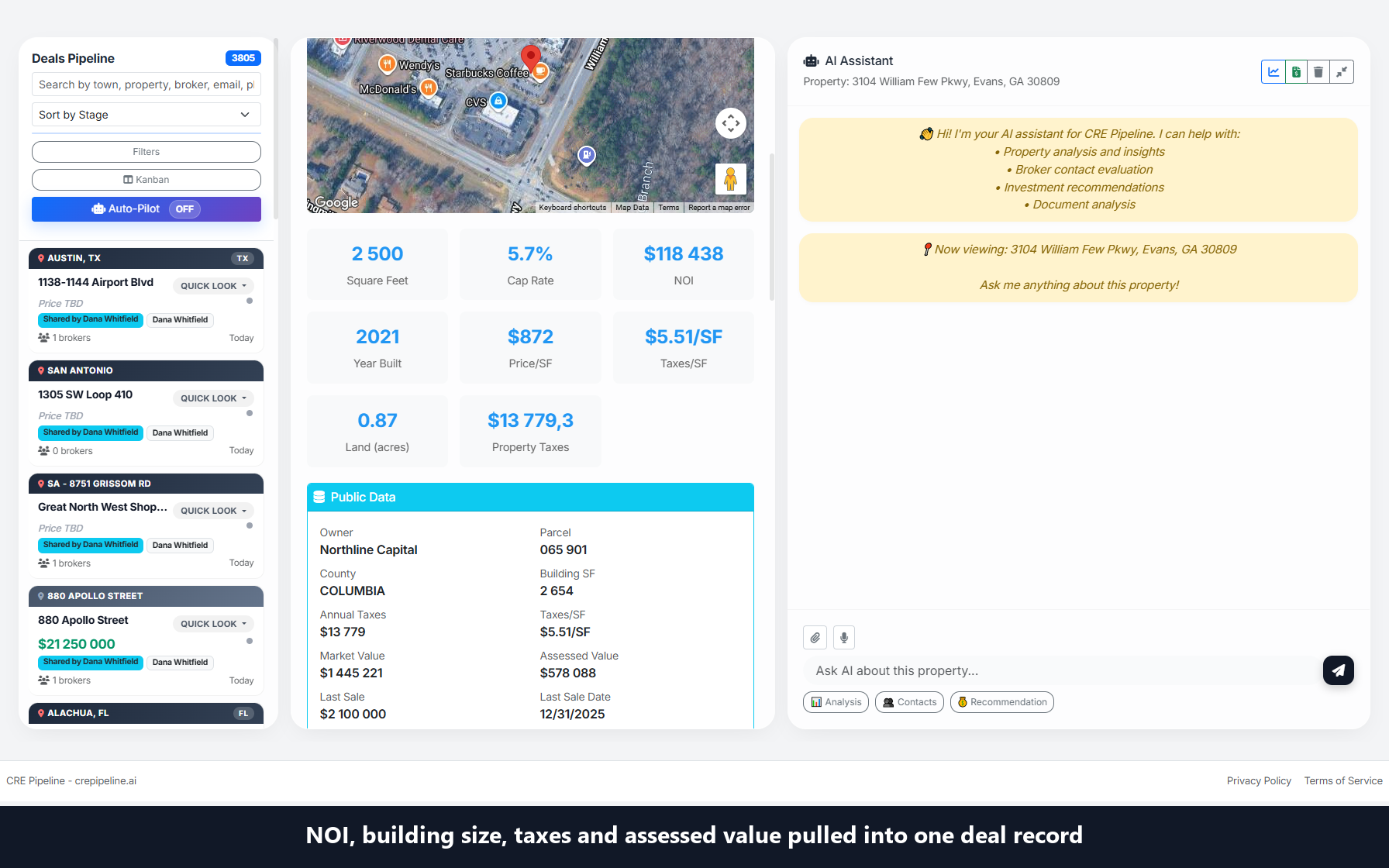
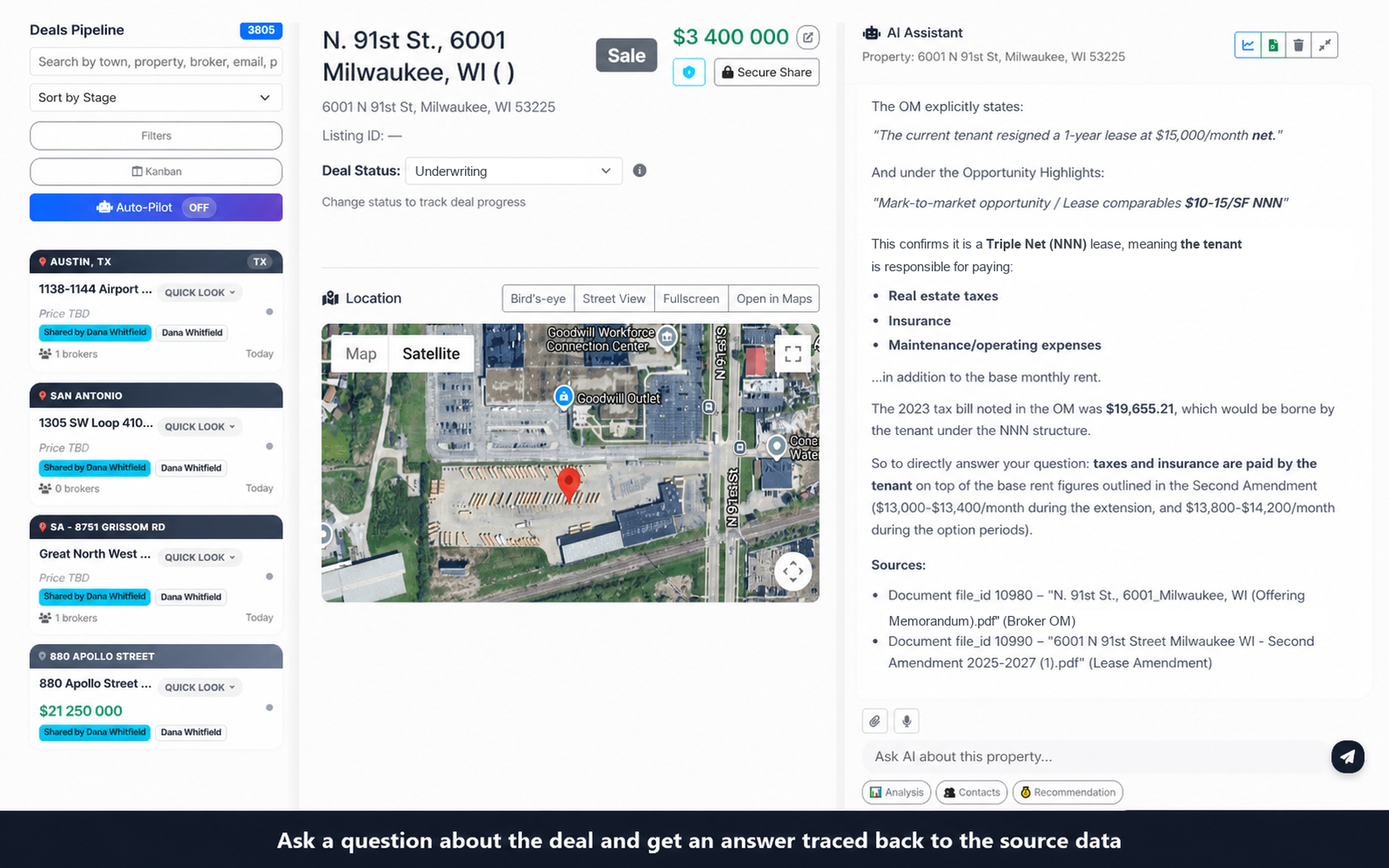
CRE Pipeline is deal-document software. After you upload a PDF OM, it builds a structured deal record from figures present in the file and keeps an AI chat scoped to that deal’s documents. Chat answers can include a Sources block naming the document used. Check the cited file and important figures yourself; a source link is not a guarantee that an answer is correct.
Manual work versus product behavior
- Analyst checklist above — deciding which NOI definition to trust, comparing to a T-12, and matching a rent roll remain your review steps when those documents exist.
- CRE Pipeline on one OM — extracts stated fields when present, leaves missing extraction fields empty, and cites document sources in chat. It does not automatically reconcile an OM to a T-12 or rent roll you have not uploaded.
If your goal is getting OM figures into a sheet or a tool rather than reviewing one deal, see how to extract data from an offering memorandum and check it.
Limits to keep in view
- Deal intake for this flow is PDF-based.
- Our internal checks of the free first-document path so far use single-tenant net-lease retail OMs; other property types are not separately verified on this page.
- For document extraction and the deal record, fields missing from the source stay empty.
- High-Level Underwriting is separate: when uploaded documents are silent, that report can estimate expense lines from portfolio benchmarks and applies fixed assumptions (see Docs).
- Scan quality affects extraction. Prefer a readable text PDF when you have one.
This page does not claim measurement accuracy, time savings, human review of your file, or a complete underwriting package. Use the Sources block and the original PDF to confirm numbers that matter to the deal.
Common questions
What does OM mean in real estate?
OM is short for offering memorandum, the marketing package a listing broker sends to prospective buyers. It summarizes the property, pricing guidance, and the financials the seller chooses to present.
Is the NOI in an OM the same as the NOI in the T-12?
Not necessarily. An OM may show in-place, trailing, or pro forma NOI. Check the label in the OM, then compare it with the trailing twelve-month statement once you have it.
Can software pull these figures out of the PDF for me?
Yes, extraction tools can read stated figures from an OM, including CRE Pipeline. Treat the output as a draft: recompute the cap rate, confirm the NOI label, and open the cited page for any figure that matters. The checks against a T-12 and rent roll still need those documents.
AI-assisted writing with automated source checks; not human underwriting, legal advice or a customer case study. Suggested procedures are optional practices, not findings about a particular deal.
The comparison checks above tell you what to line up: the OM NOI against the trailing twelve-month operating statement, and occupancy, vacancy and tenant mix against the rent roll when that schedule is available. These are document-to-document checks that cannot be finished from the OM alone. The note format below is one optional way to keep that work traceable. [Source 1]
What to record for each figure
You may find it useful to give each figure its own line in a personal note. Record the metric as the OM labels it; its basis, such as in-place, trailing or pro forma; the reporting period or rent roll as-of date; the value exactly as printed; and the file name plus PDF page or section. Then add a check status and the next document or action. This is a manual habit you choose to adopt, not a description of software behavior. [Source 1] [Source 2]
Checking a transcription versus verifying results
A figure that matches the OM PDF has only been checked against the broker package. Even when the stated cap rate agrees with the stated NOI and price, the source page says this confirms only that the OM summary is internally consistent; comparisons with supporting files still remain. [Source 1]
One option is to use three plain statuses: not yet checked, checked against the OM PDF only, and compared with a named supporting document. Keeping the middle status separate can make it harder to mistake an accurate transcription for verified operating results, in the same spirit as keeping marketed pro forma figures apart from in-place or trailing results. [Source 1]
Recording unresolved differences
When two documents appear to use different NOI definitions or periods, you could keep them on separate lines rather than averaging them or picking one. Mark the line as unresolved and name the document you expect to settle it, such as the rent roll or the trailing statement. If a figure is absent, leave the cell blank instead of inferring a value. Before you share any OM with an outside service, confirm that your confidentiality terms allow it. [Source 1] [Source 2]
Limits of this log
Deciding which NOI definition to trust and comparing figures with supporting files remain your own review steps; CRE Pipeline does not automatically reconcile an OM with a trailing statement or rent roll you have not uploaded. Its chat answers can include a Sources block naming the document used, but a source link does not guarantee that an answer is correct, so check the cited file and important figures yourself. [Source 1]
Sources and scope
- Source 1, checked 2026-10-25
- Source 2, checked 2026-10-25
- Source 3, checked 2026-10-25
- Source 4, checked 2026-10-25
Check any AI answer against the original PDF. The process described here is not a guarantee of accuracy or an investment recommendation.
Create an account, upload one offering memorandum PDF, and review the structured deal record plus document chat. Continue on CRE Pipeline Monthly when you process a second document. Details on Pricing and Docs.
Analyze your first OM free